PatriQ (Renovation roadmap)
A renovation roadmap per building that moves with your data
PatriQ, developed with Ingenium, puts the measures per building on a timeline. When the data of a building changes, the plan is recalculated.

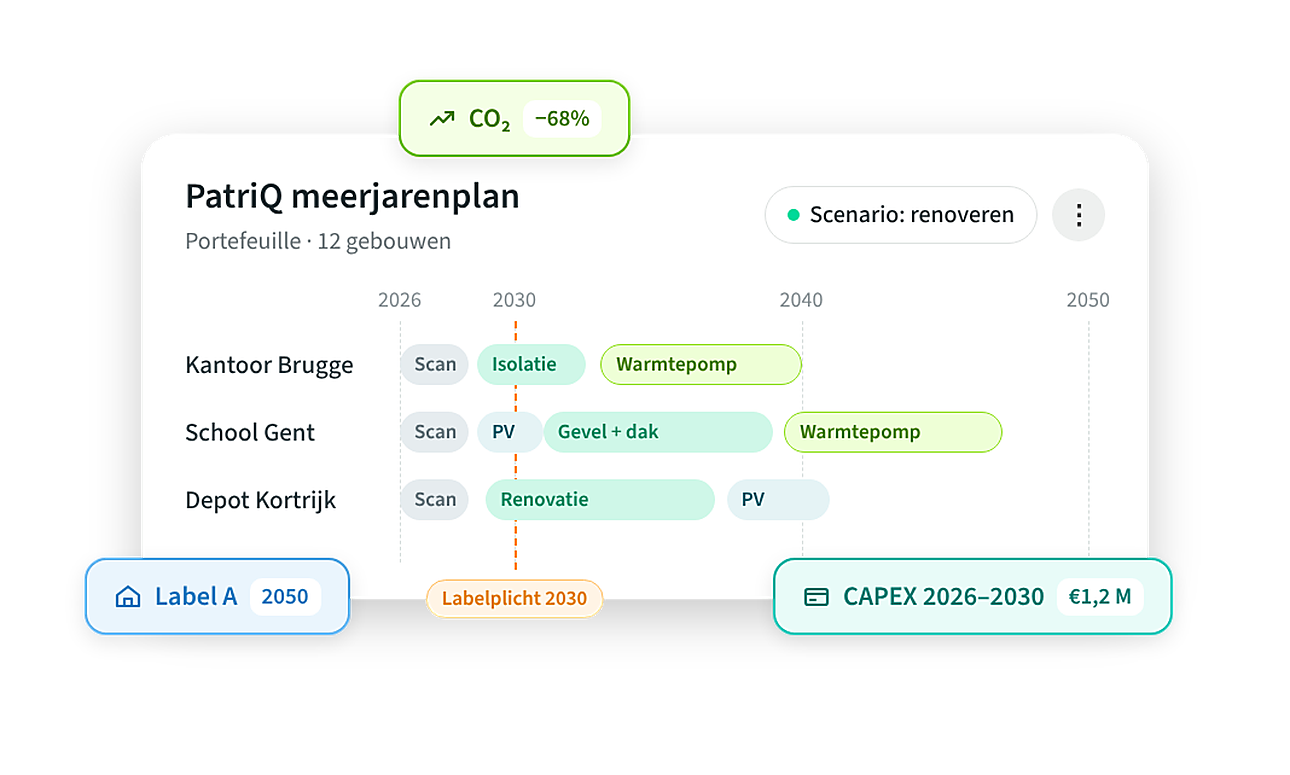

How PatriQ works
From energy label to a plan over time
Step 1 · Start
The plan starts from the data in the building passport
- What is already there
- The EPC, the floor areas and the installations are in the building passport.
- Calculated by Ingenium
- Ingenium calculates the energy impact and the investment priorities.
- Per building
- Every building gets its own plan.
From the building passportevery data point with its source
Step 2 · Compare
You put scenarios side by side
- Per measure
- You see the effect on energy use, CO₂, CAPEX and OPEX.
- Scenarios side by side
- You compare, for example, renovating in steps with everything at once.
- Over time
- Every measure gets a year.
Step 3 · Adjust
When the data changes, the plan is recalculated
- Always up to date
- A new certificate or a completed measure adjusts the plan.
- For the whole portfolio
- The plans of all buildings add up to one multi-year plan.
- One building or all
- PatriQ works for one building and for the whole portfolio.
Plan recalculatedafter a new EPC
Connected to our other modules
Frequently asked questions about PatriQ
What is PatriQ?
PatriQ is the renovation roadmap in the Alta platform, developed with Ingenium. It puts the measures per building on a timeline.
Who calculates the plan?
Ingenium calculates the energy impact and the investment priorities. The data comes from the building passport.
Does PatriQ also work for one building?
Yes. PatriQ works for one building and for the whole portfolio.
What happens when the data of a building changes?
The plan is recalculated. You always work on the latest data.